You've got LLMail
July 11, 2024 ·
TL;DR: LLMs summarize email well.

Ada Lovelace wrote to Charles Babbage in 1840 [1] showing interest in discrete mathematics, Srinivasa Ramanujan to G.H. Hardy in 1913 [2] on distribution of prime numbers. Much about written communication has changed since, so much so that in 2024, with an exponential volume compared to handwritten letters, (e)mail today has an increasingly rising chance of going unnoticed. Would Ramanujan hear back from G.H. Hardy today? With Large Language Models quickly beginning to take linguistic-inclined tasks over, and in the process, generating seemingly infinite words, one starts to wonder how much of it is being generated using LLMs...but more importantly, which communication is worth paying attention to?
The broader inquiry originated while trying to find ways to optimize startup and general business operations, probing whether a single-person-company is possible via modern day AI-enabled automatons. As a starting point, this project focuses on optimizing email traffic for a given user using Mathematica’s MBOX and MailRecieverFunction to a) analyze one’s current inbox for activity and behavioral insights, and b) set up LLM-based simple rules to equip the user with extremely short summary functionalities for a quick glance.
Thanks but I don’t want to talk to my email
I have produced analytics products for industrial purposes [3]. And while people are an inherent part of that environment, I have never looked into creating such analytics for consumer-use before. I do however use products to coordinate and manage personal communication, and I really like my email provider: Hey.com. What I like about Hey most is a “simple rule” that white-lists email addresses based on a one-time instruction, and all future emails from that address are then categorized as “screened-out” (these don’t show up in the inbox ever again), “paper trail” (for receipts and financial statements, etc.), and “the feed” (for newsletters that can be reviewed in batches). They call what’s left your “Imbox”. This basic categorization took my inbox from being really loud and messy to being really quiet and (mostly) organized. So much extra space in my inbox to do activities. However, while this simple rule goes a long way to give my inbox lots of breathing room, I did notice it’s missing the more sophisticated LLM features services like Gmail are starting to have. And while Gmail is great I’m sure, it does not invoke within me the same enthusiasm as Hey -- not even with all its “talk to your email” features. So I thought about it more while discovering available Mathematica functionalities in parallel in the early days of Wolfram Summer School, and realized I could create something fully customized for myself.
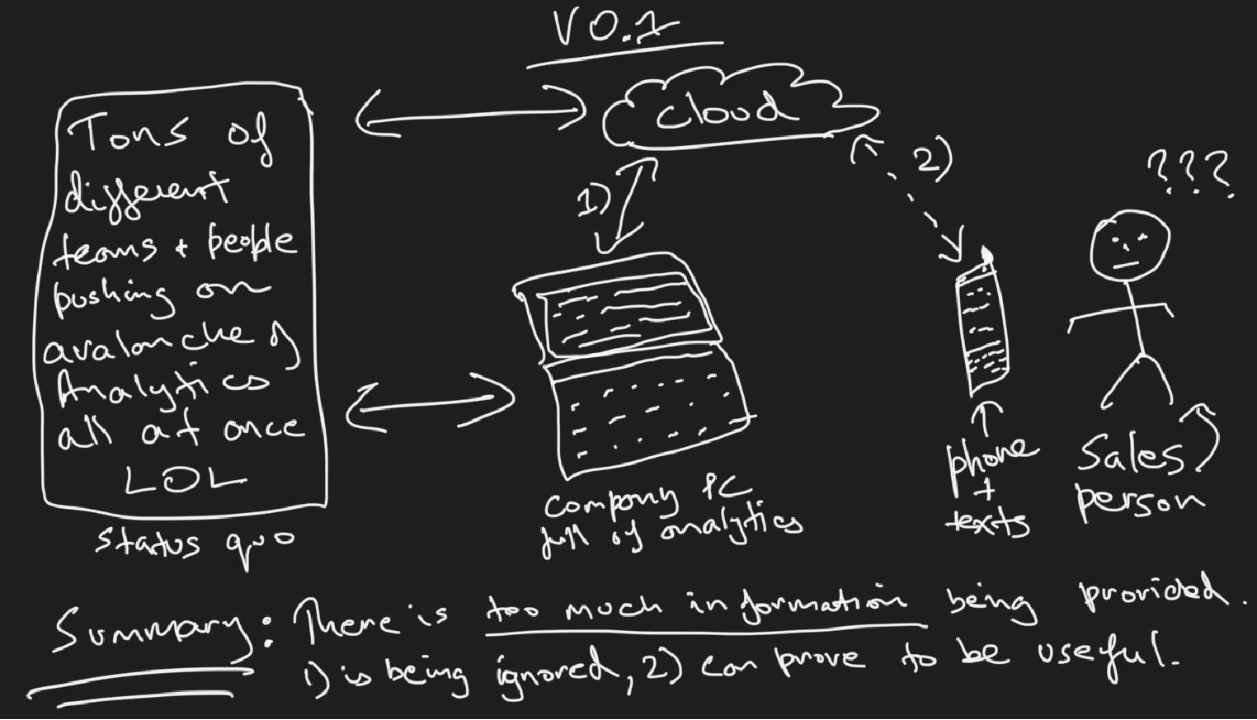
A sketch of a previous summary-via-text idea I had in 2021 for Oil & Gas sales people [4].
Inbox, Imbox, MBOX
TL;DR: Mathematica can analyze and visualize MBOX files.
I was long aware of Stephen Wolfram’s The Personal Analytics of My Life essay and his keylogging habit, but only recently realized that Mathematica functions allow you to develop any combination of such analytics for yourself. A step-by-step guide written by Paul-Jean Letourneau from 2012 on how to recreate Stephen’s analytics can be found here. For summer school, an achievable version of such a thing for me was to analyze my own inbox. After all, it’s only fair to look inwards using the type of products I’ve been making for others. I leveraged Mathematica’s MBOX function to import and dissect my emails. MBOX is a file format that contains your emails and can be readily downloaded for most services. The process is simple: import MBOX file, parse relevant categories, create visualizations.
In the following step, I imported into Mathematica the MBOX file and revealed its elements:
Import["/Users/prabrandhawa/Desktop/Wolfram/HEY-emails-prab@hey.com.mbox",{"MBOX","Elements"}]
Do make sure to update the “path” mentioned to the local path on your machine.
{"AttachmentData","AttachmentDecodedData","AttachmentDetails","AttachmentList","AttachmentNames","AttachmentSummaries","BccAddressList","BccList","BccNameList","Body","BodyPreview","CcAddressList","CcList","CcNameList","CharacterEncoding","ContentType","DeliveryChainHostnames","DeliveryChainRecords","From","FromAddress","FromName","FullMessageElements","HasAttachments","HeaderRules","HeaderString","MessageCount","MessageElements","MessageID","MessageSummaries","MIMEVersion","NewBodyContent","OriginatingCountry","OriginatingDate","OriginatingHostname","OriginatingIPAddress","OriginatingMailClient","OriginatingTimeZone","Plaintext","Precedence","QuotedContent","ReferenceMessageIDGraph","ReferenceMessageIDList","ReplyToAddressList","ReplyToList","ReplyToMessageID","ReplyToNameList","ReturnPath","ReturnReceiptRequested","ServerOriginatingDate","ServerOriginatingTimeZone","Subject","Summary","ThreadCount","ThreadDuration","ThreadEmailCount","ThreadFromList","ThreadGraph","ThreadMessageIDList","ThreadTimeInterval","ToAddressList","ToList","ToNameList"}
Then, I chose a handful of elements to look deeper into and made them into a list:
fields={"FromName","FromAddress","OriginatingDate","Subject","Body"};
After which I imported only the elements I was interested in. This saves lots of time as MBOX files can grow quite large over the years. It’s a good option to explore it in parts versus in one go.
rawData=Import["/Users/prabrandhawa/Desktop/Wolfram/HEY-emails-prab@hey.com.mbox",{"MBOX", fields}];
Creating a short list of fields enabled me to create a dataset I could analyze:
ds=Dataset[Map[AssociationThread[fields,#]&,Transpose[rawData]]]
This is what the dataset created looked like on my end:
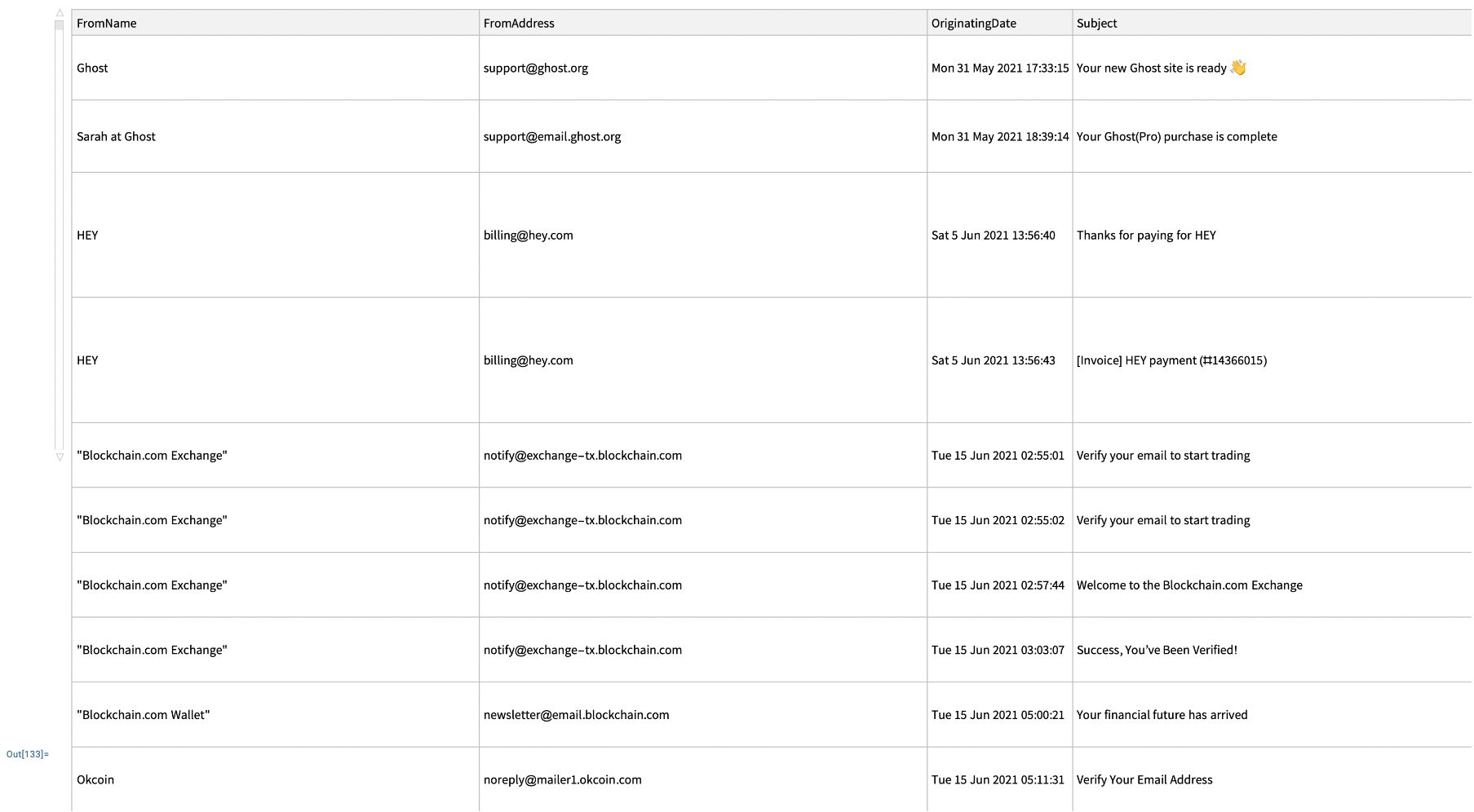
So what did my MBOX file tell me about myself?
TL;DR: Noon/Wednesday/March are the busiest times for me.
Once I had relevant data extracted, parsed, and structured, I built some basic histograms to see the data more visually. One of the obviously relevant elements was OriginalDate.
I created a variable called “dates” and created a table of all time-stamps available in the MBOX file.
dates=ds[All,"OriginatingDate"]
Then I created a “DateHistogram” using the dates variable:
DateHistogram[dates]
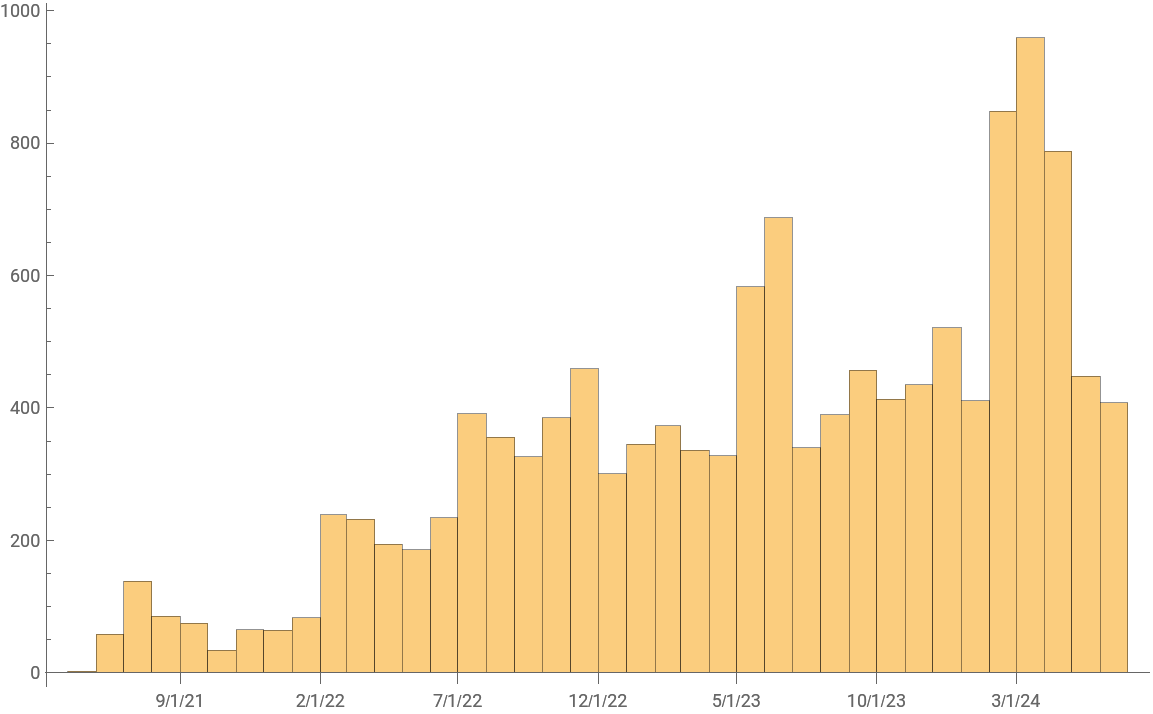
Looks like I’ve been progressively getting busier. I wondered what a weekly view looks like:
DateHistogram[dates,DateReduction->"Week"]
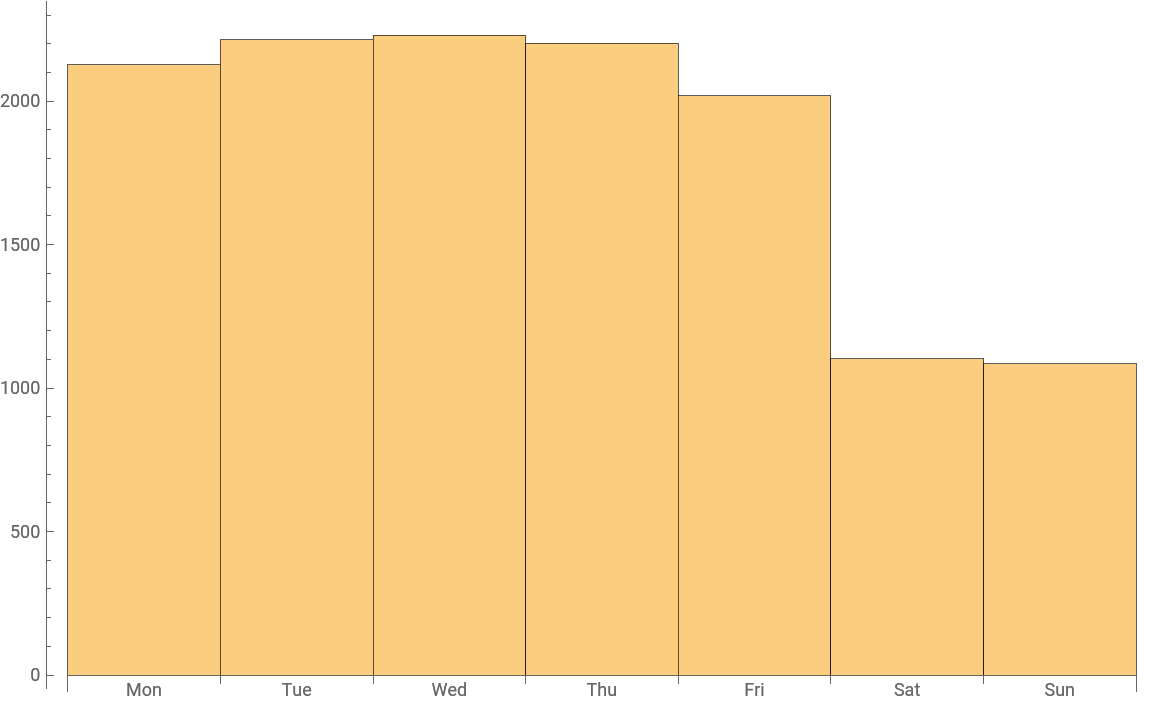
Interesting Friday slow down with a clear downturn over the weekend! What about the yearly view?
DateHistogram[dates,DateReduction->"Year"]
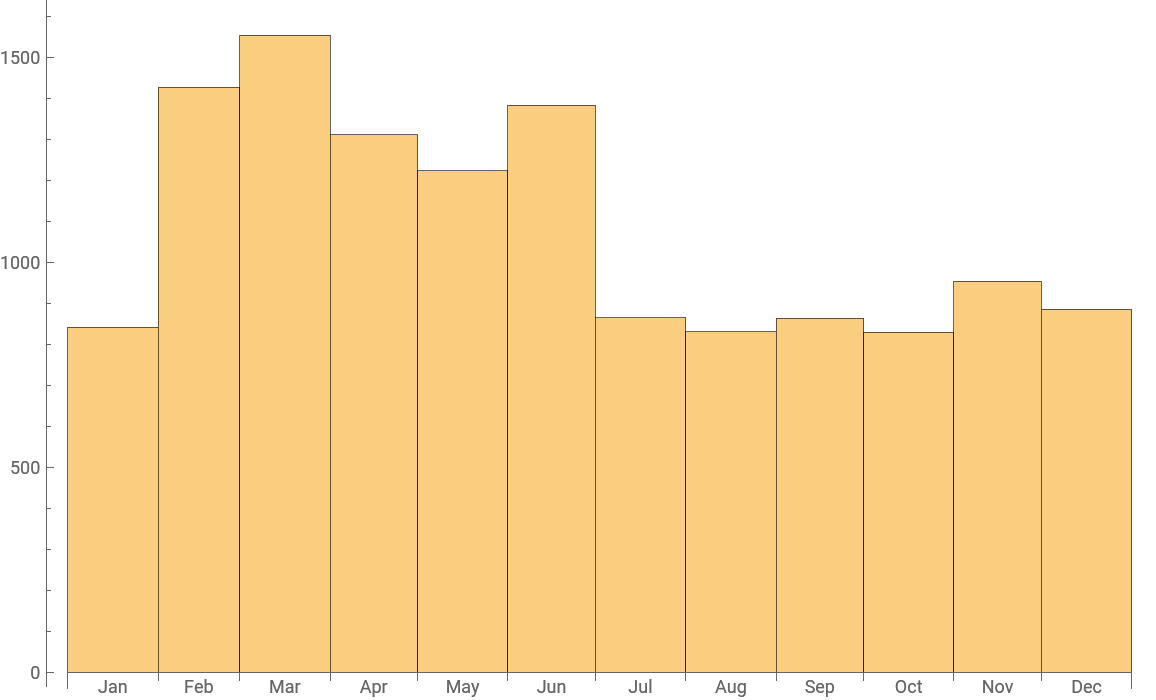
While I could continue making these charts fancier and fancier, I found that path previously well explored. And between lectures, livestreams, and social activities, time was of the essence, so I thought of going broad and exploring what else I could do with my inbox.
Friends we make along the way
I wanted to make a networked graph -- like one in this previous community post [6]. Other ideas that came to mind were SMS or Whatsapp-based messaging based on specific simple rules -- for example, receiving a text if one of the Ethereum validators I run goes down. But Christian Pasquel made this look so trivial in this “How to build a startup in 53 minutes” lecture that it made me want to try other things instead, knowing the white-listing and texting thing I had in mind could be done in only a few lines of code as Christian showcased:
whitelist={"cpasquel777@gmail","christian@curador.ai"};

CloudDeploy[\[IndentingNewLine]MailReceiverFunction[\[IndentingNewLine]Module[\[IndentingNewLine]{\[IndentingNewLine]whitelistQ=MemberQ[whitelist,#FromAddress]\[IndentingNewLine]},\[IndentingNewLine]If[\[IndentingNewLine]whitelistQ\[IndentingNewLine],\[IndentingNewLine]SendMessage["SMS",StringJoin[{#FromAddress," sent you an email"}]]\[IndentingNewLine],\[IndentingNewLine]SendMessage["SMS","Ignore the message"]\[IndentingNewLine]]\[IndentingNewLine]]&]]
This code white-lists two emails and deploys MailReceiverFunction to receive email from them.
Short Emails, Long Insights
Quick glance summaries
TL;DR: emails work great as short sentences.
While exploring what all could be done with MBOX files (with only a few examples listed above), I discovered the MailRecieverFunction -- which allows you to deploy a cloud object in the form of an email receiver that is capable of applying functions to any mail it receives. The following code (generated with the help of Claude.ai so pardon the messy code) deploys a MailReceiverFunction in Wolfram Cloud, saves relevant incoming information as listed, and adds it to the “tmp/MailLog” folder -- allowing me to run functions on the incoming email. Pretty neat!
CloudDeploy[MailReceiverFunction[Module[{existingContent,newEntry,attachmentInfo,formatRecipients},existingContent=CloudGet["tmp/MailLog"];\[IndentingNewLine]formatRecipients[recipients_]:=If[ListQ[recipients]&&Length[recipients]>0,StringJoin[Riffle[recipients,", "]],"None"];\[IndentingNewLine]attachmentInfo=If[Length[#Attachments]>0,StringJoin["The email contains ",ToString[Length[#Attachments]]," attachment",If[Length[#Attachments]>1,"s",""],":\n",StringJoin[MapIndexed[" "<>ToString[First[#2]]<>". "<>#1["Name"]<>" (Type: "<>#1["ContentType"]<>")\n"&,#Attachments]]],"The email contains no attachments."];\[IndentingNewLine]newEntry=StringJoin["From: ",#From,"\n","To: ",formatRecipients[#To],"\n","Cc: ",formatRecipients[#Cc],"\n","Subject: ",#Subject,"\n","Sent: ","\n","Attachments: ",attachmentInfo,"\n\n","Message Body:\n",#Body,"\n\n","---\n\n"];\[IndentingNewLine]CloudPut[If[StringQ[existingContent],existingContent<>newEntry,newEntry],"tmp/MailLog"]]&]]
InterpretationBox[RowBox[{"CloudObject", "[", RowBox[{"\"mailto:\"", TemplateBox[{"\"receiver+1nLElMVqF@wolframcloud.com\"", "mailto:receiver+1nLElMVqF@wolframcloud.com"}, "HyperlinkURL"]}], "]"}], CloudObject["https://www.wolframcloud.com/obj/8e22a40a-26cd-4fba-a946-d7de6e4e1a86", MetaInformation -> {"EmailAddress" -> "receiver+1nLElMVqF@wolframcloud.com"}]]
This was quite new and fascinating to me. While I still continue to think what all I can do with such functionality, I was in search of a quick-win to make a demo out of within 2 weeks. And then, coincidentally one day, I had the opportunity to observe how Stephen Wolfram reads his email. As part of this entertaining and insightful exercise, he showcased a newsletter he liked -- which listed extremely bite-sized summaries of news stories and world events. This was initially bizarre, but it later occurred to me that it was in fact user-centric.
Good technology gives you time to go do other things.
I then asked ChatGPT to help me write code summarizing contents of the folder “tmp/Maillog”:
(*Fetch the content from the cloud object*)cloudContent=CloudGet["tmp/MailLog"];\[IndentingNewLine]
(*Create an LLMFunction to summarize the text*)\[IndentingNewLine]summarizeFunction=LLMFunction["Summarize the emails in extremely short sentences that include maximal context:\n\n`1`"];\[IndentingNewLine]\[IndentingNewLine](*Use the LLMFunction to summarize the cloud content*)
summary=summarizeFunction[cloudContent];
Print[summary];
It worked! The LLM (OpenAI’s ChatGPT 4o) summarized some test emails perfectly:
1. Prab asks about a picnic next Saturday.
2. Prab suggests dinner at 9 PM tomorrow.
3. Prab inquires about attending a Summer School Check-in at 4:20.
4. Prab follows up on the Summer School Check-in, asking for a response.
5. Prab forwards an urgent message about Validator 441314 being offline.
6. Prab tests if a QR code works.
7. Christian suggests meeting at 7 PM for fireworks.
8. Chase sends a brief "Hello!" email.
9. Vladimir asks if Prab is still interested in getting more customers and offers a call link.
The output is a short list of sentences summarizing incoming email. More room for activities!
Fun mode: sort by emoji, ask Dall-E for pictures
Vlad Grankovsky came up with the fun idea of adding emojis ahead of the summaries to sort them into categories based on urgency and deadlines which I thought was quite neat/visual:
- 🔥- VERY VERY URGENT (might be today)
- 🚨- urgent: deadline unknown
- ⏰- urgent: deadline known
- 🔗- coming from person with interaction before
- 👨👩👧👦- from close family member
- 🗞️- spam-like email, trying to sell something
- ✅- action required
- 👌- easy to deal with
- 🤖- automated email
I explained the situation to ChatGPT and it coded me the following:
(*Fetch the content from the cloud object*)cloudContent=CloudGet["tmp/MailLog"];\[IndentingNewLine]\[IndentingNewLine](*Create an LLMFunction to summarize the text*)
summarizeFunction=LLMFunction["Summarize the emails in extremely short sentences that include maximal context while mentioning who it's from. Prefix each summary with an appropriate emoji based on the following key:
🔥 VERY VERY URGENT (might be today)
🚨 urgent: deadline unknown
⏰ urgent: deadline known
🔗 coming from person with interaction before
👨👩👧👦 from close family member
🗞️ spam-like email, trying to sell something
✅ action required
👌 easy to deal with
🤖 automated email
Format each summary as:
`[emoji] [FromName] [summary]`
For example:
`🔗 John from accounting needs Q3 report by Friday`
If multiple categories apply, choose the most relevant emoji.:\n\n`1`"];\[IndentingNewLine]
(*Use the LLMFunction to summarize the cloud content*)\[IndentingNewLine]summary=summarizeFunction[cloudContent];
Print[summary];
Christian Pasquel also had the idea of passing these summaries over to Dall-E for image generation which he wrote me some blazing fast code for. I’ll attach that file to this post.
I asked Dall-E to create an image from the example summaries. It didn’t go too well.
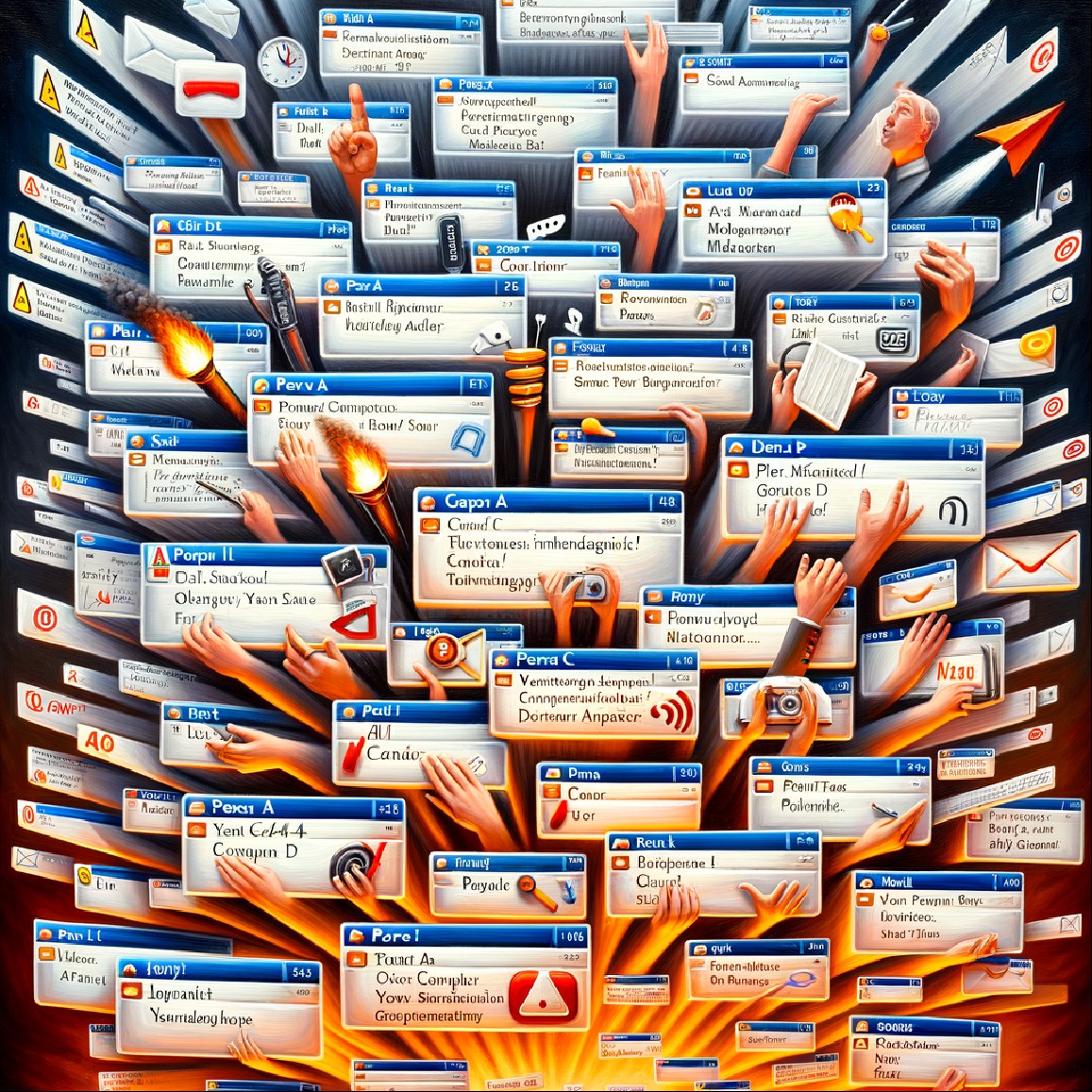
I then asked for "Impressionist painting of a calm inbox" -- which is the UX I aim for.

It’s incredibly cool that you can do everything I have done so far right inside your notebook.
Future work: threads analysis, previous interactions
All in all, I experimented with a few different types of features one can create for themselves using Mathematica -- most notably MBOX and MailRecieverFunction. This allowed me to create some fun proof-of-concept prototypes to analyze my inbox behavior and gave me the ability to deploy my own set of “simple rules” to create a sense of calm. But what may future iterations of these ideas look like? Some ideas we came up with in group discussions were: hypergraphs for email, thread-summarization (does this thread need me to do something, what’s the latest on this discussion, etc.), are there emails the user should have responded to but has not yer responded to, and “have we ever talked before?” type functionalities. I am certain Mathematica has the toolset to create such features if one is willing to spend the time -- it would make for fun future Wolfram Summer School projects.
Concluding Remarks
We all are at the center of our own universe of data. But as data generation and tracking increases exponentially, simple-rules-based filters become key. I believe understanding one’s personal behavior can reveal many insights, and these insights are also at the heart of enabling solo entrepreneurship to levels unseen before. But I remain skeptical of automation enabling a “one-person billion dollar companies” just yet. What may be much more viable in 2024 is a one-person company that has No Meetings, No Deadlines, No Full-Time Employees [5] -- an idea that perhaps I could further explore in a future post. Now that “talk to your email” type LLM features are starting to become commonplace, there remains tons of benefit in understanding and exploring the building block functional processes that enable such tools -- in order to aggregate and summarize incoming information automatically and to one’s own liking; ironically also using LLMs. This project focused as a starting point on email automation while exploring how its underlying IMAP/SMTP protocols interact with Mathematica. The same structure and concepts explored can be expanded upon and implemented on any consumer messaging application like WhatsApp, Instagram, Telegram, Signal, etc. as needed. Article keywords: email, e-mail, chat, LLM, AI, LLMail, Mathematica, IMAP, SMTP
Acknowledgments
Thanks to Christian Pasquel and Vlad Grankovsky for their mentorship throughout the process and for enabling these insights via great conversation and showcasing past examples, both from their personal lives as well as past summer school projects. Thanks to Phileas Dazeley-Gaist for the beginner-friendly Mathematica tutorial early on, and for neat insights on ecological complexity; not to forget the fun campus tour on the first day. And many thanks to Stephen Wolfram for sharing his personal analytics and ways of working, most notably the newsletter that contained one-line summaries of world events that inspired the idea of summarizing incoming email traffic into extremely short sentences.
References
-
S. Wolfram (2015), “Untangling the Tale of Ada Lovelace,” Writings. https://writings.stephenwolfram.com/2015/12/untangling-the-tale-of-ada-lovelace/.
-
S. Wolfram (2016), “Who Was Ramanujan?,” Writings. https://writings.stephenwolfram.com/2016/04/who-was-ramanujan/.
-
P. Randhawa (2018), “Shell Tank Level Monitoring,” Shell USA, Inc. https://www.shell.us/business-customers/lubricants-for-business/lubricants-services/tank-level-monitoring.html.
-
P. Randhawa (2021), “v 0.1: no-nonsense analytics notifications,” Gumroad, Inc. https://prabhchintan.gumroad.com/l/notification?layout=profile.
-
S. Lavingia (2021), “No Meetings, No Deadlines, No Full-Time Employees,” https://sahillavingia.com/work.
-
J. Gerlach (2021), “[WSC21] Visualizing email threads using graphs,” Wolfram Community. https://community.wolfram.com/groups/-/m/t/2318600.
Cite This Notebook
“You've got LLMail” by Prab Randhawa https://community.wolfram.com/groups/-/m/t/3210142
comments section
~$1/comment: pay with card · pay with Ethereum